
 By
By 
Metrash2 is a mobile application service provided by the State of Qatar’s Ministry of Interior.
This platform allows citizens and residents to access a range of government services through their smartphones conveniently.
Users can perform various functions, such as renewing driving licenses, managing Qatar visas and residency permits, paying traffic fines, and receiving important notifications.
Metrash2 aims to streamline administrative processes, enhancing the efficiency and accessibility of essential government services while reducing the need for in-person visits to government offices.
Developed by the Ministry of Interior in Qatar, this app offers a wide range of services designed to streamline bureaucratic processes and enhance the daily lives of its users.
Whether you’re a long-time resident or a newcomer, understanding how to utilize Metrash2 can significantly simplify your interactions with various government services.
Introduction to Metrash2
Metrash2 is more than just an app; it is a revolutionary gateway to accessing essential government services via your smartphone.
Especially in Qatar, where government processes often require personal attendance and several documents, Metrash2 provides a digital alternative that saves time and effort.
This mobile application is available for download on both iOS and Android platforms, ensuring broad accessibility for all residents.
What Services Does Metrash2 Offer?
From traffic violation settlements to visa extensions and residency renewals, there’s hardly a service related to daily living in Qatar that Metrash2 doesn’t cover.
Detailed List of Services Offered by Metrash2:
- Driving License Renewal: Easily renew your driving license without visiting the traffic department.
- Residency Permit Management: Apply for, renew, and manage your residency permits.
- Visa Services: Extend visas, apply for family visas, and manage sponsorships.
- Traffic Violations: Pay fines and check for any outstanding traffic violations.
- Vehicle Registration: Renew your vehicle registration and manage your fleet.
- Notifications: Receive important government alerts and announcements.
- National Address Management: Update and manage your national address.
- Document Requests: Request for official documents and certificates online.
- Sponsor Management: Manage sponsorship details and transfer sponsorships.
- Criminal Record Certificate: Apply for and receive criminal record certificates.
- Account Services: Register and manage your account settings within the app.
With such a vast array of functionalities, Metrash2 not only simplifies the logistics of managing your residency but also enhances your ability to live freely and confidently without the constraints of traditional paperwork.
NOTE: The app supports a wide range of services, making it an indispensable tool for residents.
How to Download and Install Metrash2
Accessing Metrash2 is straightforward, but before you begin the download, ensure your device meets the compatibility requirements.
The app is available on both Google Play Store and Apple App Store.
To download Metrash2, visit the app store on your device, search for “Metrash2,” and click the install button.
Once downloaded, open the app and follow the on-screen instructions to set up your account.
Creating Your Metrash2 Account Step-by-Step
Registration on Metrash2 is essential to access its myriad services.
Upon launching the app for the first time, you’ll be prompted to create an account using your Qatar ID (QID) number and a valid mobile number registered under your name.
There are every step described:
- Download the App: Download the Metrash2 app from the Google Play Store or Apple App Store, depending on your device. Ensure your device meets the compatibility requirements.
- Open the App: Once the download is complete, launch the app by tapping the Metrash2 icon on your smartphone’s home screen.
- Select Language: Upon opening the app, you’ll be prompted to select your preferred language. Choose the language you’re most comfortable with to proceed.
- Enter Qatar ID (QID) and Mobile Number: You will be asked to enter your Qatar ID (QID) and mobile numbers. Ensure the mobile number is registered in your name, which is necessary for verification.
- Receiving OTP: After entering the necessary information, you will receive a one-time password (OTP) via SMS on the mobile number you provided. Enter this OTP in the app to verify your identity.
- Create a Password: Once your identity is confirmed, set up a secure password for your Metrash2 account. Ensure the password is strong and comprises a mix of letters, numbers, and symbols.
- Complete Registration: Follow any additional on-screen prompts to finalize the registration process. This may involve agreeing to terms and conditions or completing further personal information.
- Access Services: After completing registration, you can start using Metrash2 to manage various government services linked to your account. Explore the app’s features to familiarize yourself with its functionalities.
By following these steps, you can seamlessly set up your Metrash2 account and streamline your access to essential services provided by the State of Qatar’s Ministry of Interior.
NOTE: Make sure the provided mobile number is active, as vital updates and OTPs are sent to it.
Navigating the Metrash2 Interface
The Metrash2 interface is designed with user-friendliness in mind.
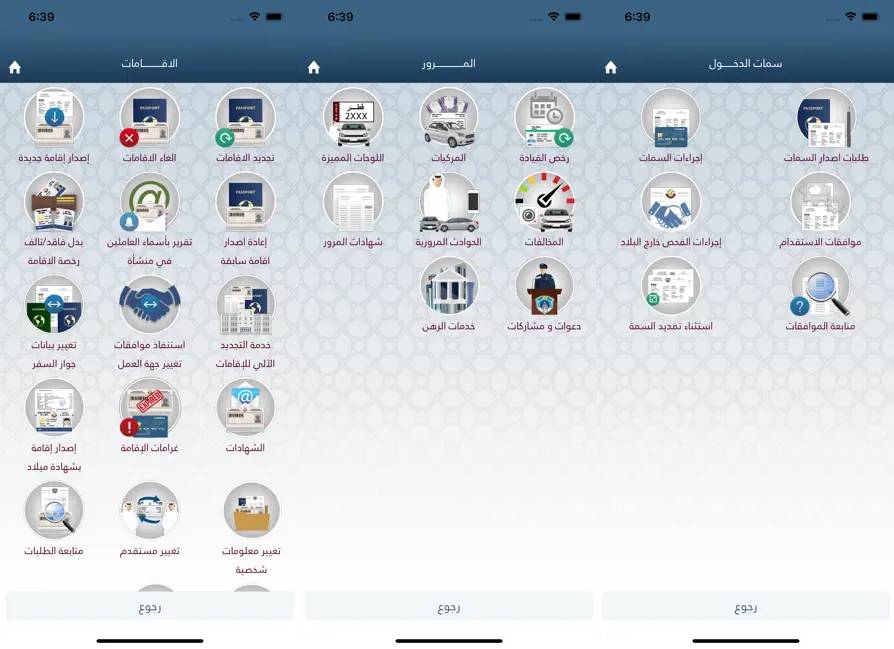
Once logged in, users are greeted with a clean dashboard showcasing various categories of services.
Key sections include “Traffic Services,” “Visa Services,” and “Personal Services,” among others.
Each section is easily navigable, allowing users to quickly find and access the required service.
Setting Up Your Profile
To personalize your experience, setting up your user profile correctly is crucial.
Navigate to the profile settings, where you can input additional personal information such as email address, physical address, and emergency contact details.
Adjust your notification preferences here as well to ensure you receive timely updates about your applications and service requests.
Understanding Metrash2 Features
Metrash2 is lauded for its versatility.
It handles mundane tasks like paying traffic fines and complex procedures such as managing visa applications.
Users can leverage the app to check their visa status, apply for new visas, or extend existing ones.
The app facilitates easy reporting of lost items, ensuring that every minor to primary service need is covered.
Here is an exhaustive list of the features available within the Metrash2 application:
- Traffic Violation Management: Pay fines, view violation details, and monitor driving records.
- Vehicle Registration Services: Renew vehicle registration, transfer ownership, and access vehicle-related information.
- Visa Services: Apply for, track, and renew visas for you and your dependents.
- Criminal Record Certificate: Request and receive criminal record certificates and other official documentation.
- National Address Management: Update and manage your national address for accurate service delivery.
- Sponsor and Residency Management: Manage sponsor details and transfer sponsorships, as well as handle residency permits.
- Document Services: Request and retrieve official documents and certificates electronically.
- Notification System: Receive essential alerts and announcements directly from the government.
- Lost and Found Reporting: Report lost items and check for found items through the app.
- Account Services: Register, update, and personalize account settings, including profile information and notification preferences.
- Reporting Services: Submit various reports concerning personal circumstances, such as lost documents or changed information.
- Service-Based Navigation: An intuitive system that categorizes services into groups such as “Traffic Services,” “Visa Services,” and “Personal Services,” ensuring ease of access and usability.
These robust features ensure that Metrash2 remains a comprehensive and indispensable tool for residents wishing to streamline their interaction with government services in Qatar.
How to Pay Traffic Fines via Metrash2
Paying traffic fines has never been easier with Metrash2.
- Begin by navigating the “Traffic Services” section, selecting “Fines Payment,” and entering your vehicle’s license plate number.
- The app will display any outstanding fines linked to your vehicle.
- Select the fines you wish to settle and proceed to payment through the secure gateway.
NOTE: A receipt of payment is instantly generated for your records.
Requesting Police Clearance Certificates
A key service provided by Metrash2 is the ability to request a police clearance certificate, an essential document for many administrative processes.
To apply, access the “Personal Services” section, select “Police Clearance Certificate,” and fill in the required personal information.
Submit the form, and you’ll be notified when your certificate is ready for collection.
Managing Visa Applications through Metrash2
Visa management is one of the most compelling features of Metrash2.
Whether you’re applying for a new visa, checking the status of an ongoing application, or renewing an existing visa, Metrash2 simplifies the process.
Navigate to the “Visa Services” section, choose the desired service, and follow the application instructions.
NOTE: Ensure that all required documents are uploaded to avoid delays.
Reporting Lost Items through Metrash2
Metrash2 makes it easy to report lost items or documents to authorities.
Access the “Reports” section, provide details about the lost item, and submit the report.
This helps expedite recovery procedures and minimizes the potential misuse of lost items.
Troubleshooting Common Issues in Metrash2
While Metrash2 is reliable mainly, users may occasionally encounter issues such as the app freezing during updates or login problems.
If faced with such issues, ensure your app is updated to the latest version.
Clearing the cache or reinstalling the app can also resolve many problems.
The following issues are most common:
- App Freezing During Updates: The application may sometimes become unresponsive when updates are being installed.
- Login Problems: Difficulty logging into the app can often be resolved by checking internet connectivity or resetting the password.
- Slow Loading Times: Pages or features may take longer than expected to load, especially during peak usage times.
- Error Messages: Occasionally, users might encounter unexpected error messages that can interrupt their tasks.
- Payment Gateways Issues: Trouble during payment, such as failed transactions or the app not recognizing payment details.
- Document Upload Failures: Challenges in uploading documents might be due to file size restrictions or unsupported file formats.
- Inconsistent Notifications: Users might not receive timely alerts or updates, possibly due to notification settings.
- Service Unavailability: Certain features or services may not be accessible temporarily due to maintenance or technical issues.
If any of these issues persist, users are advised to contact Metrash2 support or refer to the app’s help section for further assistance.
NOTE: The customer support team is responsive and resolves inquiries swiftly for persistent issues.
Updates and New Features in Metrash2
The Metrash2 team continuously works on enhancing app features and addressing user feedback.
Comparing Metrash2 with Other Government Apps
Compared to government apps in other countries, Metrash2 stands out due to its comprehensive range of services and user-friendly design.
While some countries offer similar functionalities, Metrash2’s integration with the Ministry of Interior’s database sets it apart by providing real-time updates and streamlined processing.
Tips for Maximizing Your Experience with Metrash2
To get the most out of Metrash2, ensure your app is always updated to the latest version.
Familiarize yourself with the app’s layout and explore all available services to understand its full capabilities.
Regularly check for new features and updates that may enhance your user experience.
Conclusion: The Future of Digital Services in Qatar
Metrash2 exemplifies the future of digital governance in Qatar, offering an accessible, efficient, and comprehensive solution for residents’ service needs.
By integrating such digital solutions, Qatar not only enhances the convenience of its citizens’ daily lives but also positions itself as a leader in digital innovation in the Middle East.
For anyone living in Qatar, utilizing Metrash2 is not just a convenience, it’s a gateway to a more streamlined and connected lifestyle.
For more details, visit the official website of Metrash2 or download it on Google Play or Apple App Store.